Atd 0.12.0
Model aliases, richer screenshot annotations with floating pins, and built-in diagnostics
Bundle model, context window, and reasoning effort into reusable aliases, annotate and pin screenshots on top of your workspace, inspect permissions and health with a 7-layer Doctor, and open Atd faster.
Reusable model aliases for one-click switching
Save a connection, model, context window, and reasoning effort under one name in Settings › Models › Model aliases — or start from built-in presets — and use the same alias across conversations, commands, and automations:
- Inherit or override defaults — leave context window or reasoning effort inherited from the connection or model, or pin custom values and reset to inherited anytime; switching models automatically clamps reasoning effort to supported levels.
- Update once, apply everywhere — editing an alias updates every command and automation bound to it, and you can set a default model alias for new sessions.
- Switch from the composer — pick an alias from the model switcher, type
/model, or press⇧⌘M(customizable under Settings › Shortcuts). Draft tweaks stay scoped to the current conversation without altering saved alias defaults, with one-click Restore or Save as new alias.
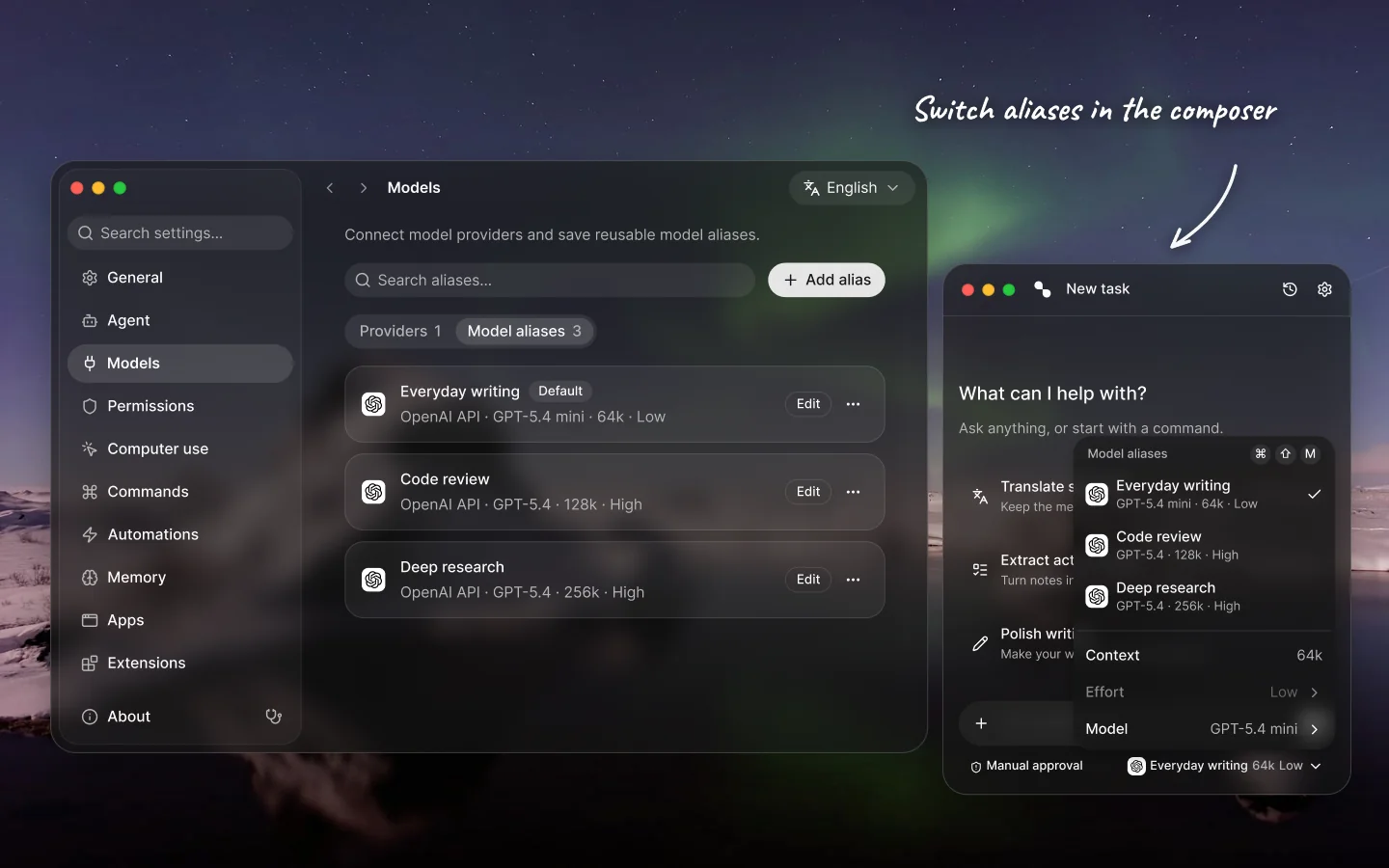
Expanded screenshot annotations and floating pinned cutouts
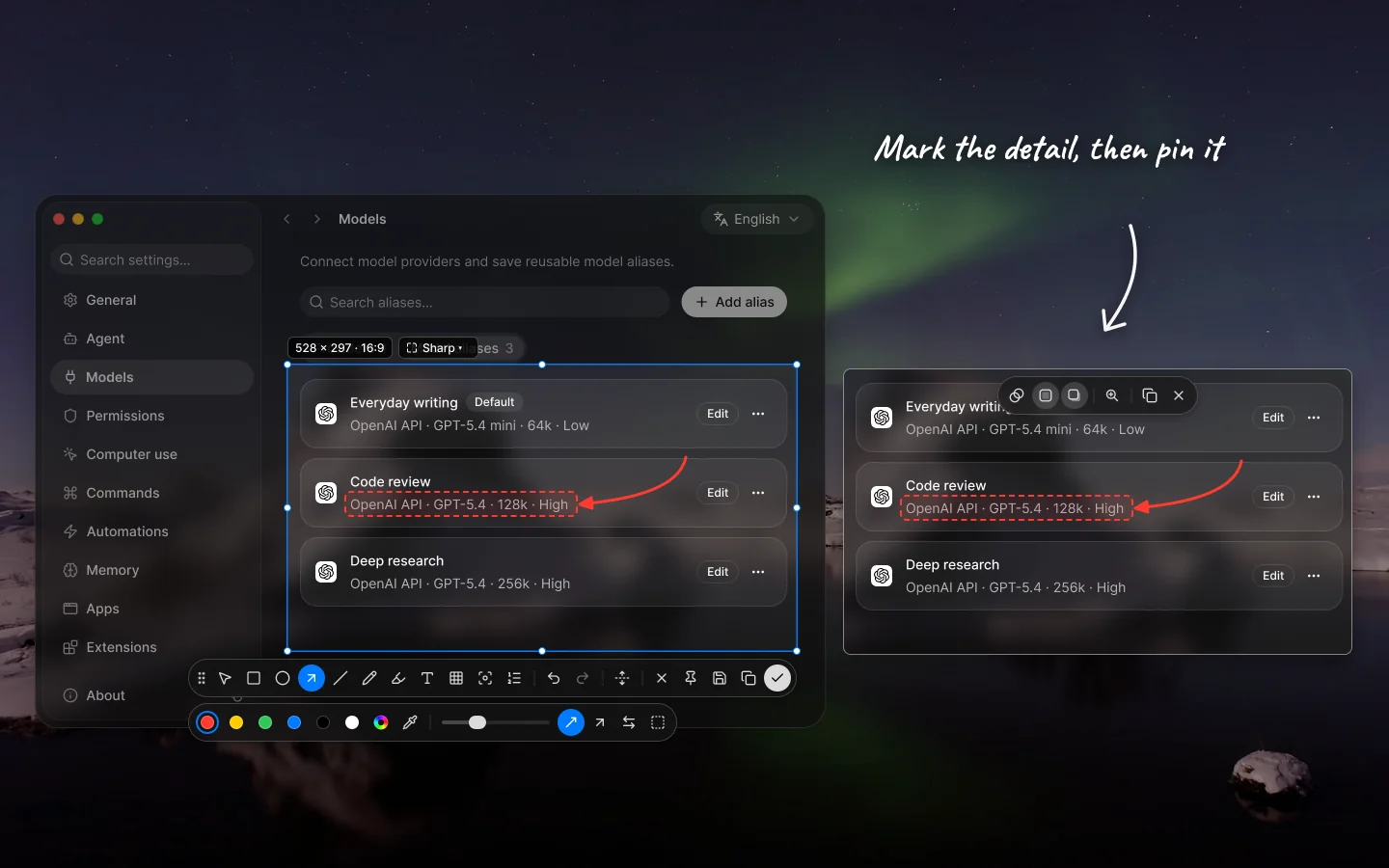
Mark up screenshots with finer control, then keep any capture hovering above your apps while you work:
- Pin to screen — click Pin on the screenshot toolbar to turn a capture into a borderless always-on-top window that follows you across Spaces, with zoom (
+/-/0), opacity (⌘+/⌘-/⌘0), toggleable border (B) and shadow (S), copy (⌘C), and close (Escor⌘W). - Richer shapes, arrows, text, and Smart Shapes — choose outline, soft, or solid fills, sharp or adjustable rounded corners, dashed strokes, tapered/classic/double-headed or curved arrows, four text plate styles (none, solid, frosted, outlined), spotlight shapes and dimness, numbered or lettered step markers, and region or freehand brush mosaic. Hold steady at the end of a Pen stroke to snap freehand sketches into crisp lines, curves, rectangles, or ellipses, and multi-select, duplicate, copy/paste, or reorder layers from the context menu.
- Color wheel, eyedropper, fonts, and presets — pick exact colors with Hex, opacity, recent swatches, and the eyedropper (plus loupe color copy), browse curated, Google, local, and recent fonts, and lock selection aspect ratios (
1:1,4:3,16:9,9:16) from the dimension badge.
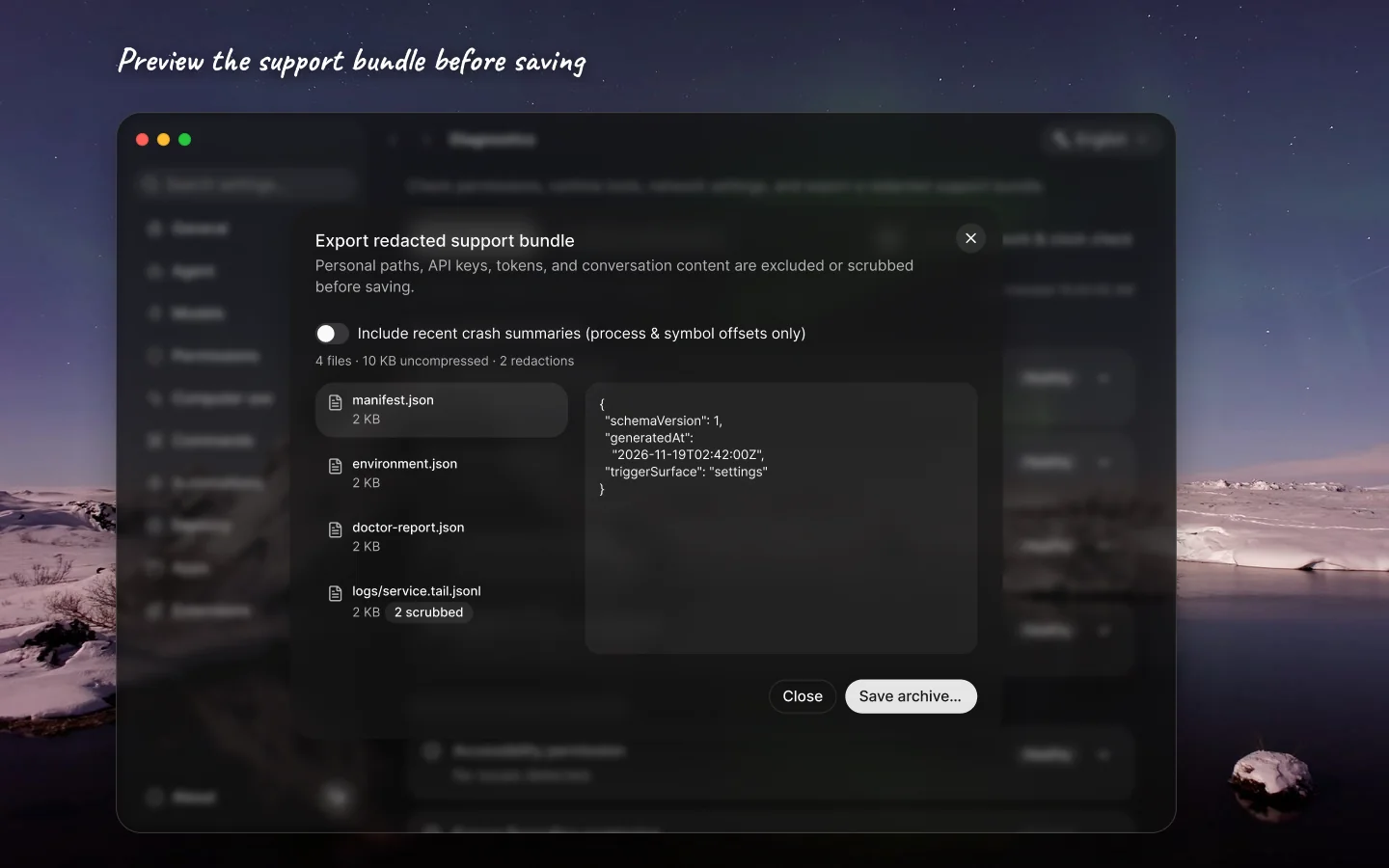
Built-in Diagnostics, 7-layer Doctor, and redacted support bundles
Click the Diagnostics icon button beside About in Settings — or choose Diagnose from a service notice — to inspect your environment and troubleshoot issues in place:
- 7-layer Doctor — checks app placement and code signature, macOS permissions and keychain, agent service and local storage, login shell
PATHand CLI tools (git,uv,npx,rg, Node.js), system proxy/TLS/clock alignment, native add-ons/MCP/file and memory indexes, and optional on-demand network connectivity, with inline actions to jump straight to System Settings or restart the service. - 10-second interactive live probes — test the selection toolbar, global shortcuts and modifier handoff, or screen capture and display arbiter locks in real time without recording typed characters, selected text, or screen pixels.
- Redacted support bundles — preview every file, redaction count, and excerpt before saving a
.ziparchive; a 5-pass privacy scrubber excludes or redacts personal paths, API keys, tokens, and conversation content automatically, alongside a native glass recovery card if a window or service fails to load.
Improvements
Faster app startup and first paint: parallelized agent-service initialization and deferred optional runtimes (MCP authority, provider runtime, packaging helpers) to first use, primed panel startup state and code-split secondary views (
TaskStage,TaskHistory,AppsView,QuickPanel, session menu, syntax highlighting, and glow canvas), and gated panel and settings reveals on nativeWindowLoadingStagereadiness.Screenshot confirmation modes: configure under Settings › General › Screenshot whether confirming a screenshot attaches to the composer and copies, attaches only, or copies to the clipboard only, with a toggle for screenshots started from composer
+ › Screenshot.Richer inline setup in the Welcome guide: adjust appearance, selection-toolbar icon mode, and screenshot shortcuts or confirmation directly during onboarding, see default model aliases and unreadable-credential states on the Models step, and view updated capability illustrations.
Smoother long-screenshot scrolling and stitching: live long screenshots now pass wheel events straight through a non-blocking backdrop so you can scroll naturally without moving the cursor inside the selection, and Auto-scroll uses window-targeted continuous pixel scrolling at 60 fps with stronger full-area matching, rebound suppression, and jump bridging.
Looping keyboard navigation and stationary hover gating: menus, lists, model pickers, quick panel, settings navigation, and floating island option cards wrap cleanly with arrow keys and ignore a stationary pointer so keyboard selection stays in control.
Settings › Memory now switches category filters with tabs that preserve your active group across detail views, and quick commands in the panel cap cleanly in a scrollable region above the action row.
Fixes
Fixed closing a shell panel or secondary window promoting keyboard focus onto a covered resident or floating panel instead of handing focus to the next uncovered window or foreground app.
Fixed floating glass surface outlines and content springs drifting out of sync during animated resizes and reveals.
Fixed screenshot text commands skipping paragraphs or breaking when a model echoed paragraph identifiers.
Fixed collapsible rows — including Doctor check details and advanced provider endpoint fields — holding stray spacing or snapping abruptly when folded.
Fixed reasoning-effort inheritance and clamping when switching model aliases across models with different supported effort levels.
Hardened Diagnostics log scrubbing, archive export, unauthenticated endpoint reachability probes, live probe cancellation, proxy alignment deduplication, and stable placeholder layout while checks load.