Models
Bring your own AI models to your Mac
Atd brings no model of its own and needs no Atd account. Connect the providers you already use, from a ChatGPT plan or an API key to a model running on your own machine, and requests go straight to them.

Four ways to connect a model
Open Settings → Models and choose Add provider. The catalog groups providers by how you connect:
- Account login: sign in with a ChatGPT plan or an OpenRouter account in your browser.
- API keys: OpenAI, Anthropic, Google, xAI, DeepSeek, Mistral, Groq, OpenRouter, Kimi (Moonshot), Z.AI and Zhipu BigModel, MiniMax, Alibaba Cloud Model Studio, Xiaomi MiMo and more.
- Cloud services: Amazon Bedrock, Azure, Google Vertex AI and Cloudflare; Bedrock and Vertex AI can use the AWS or Google Cloud credentials already configured on your Mac.
- Local and custom: Ollama, LM Studio, llama.cpp, vLLM, or a custom provider at any base URL.
Use your ChatGPT plan instead of an API key
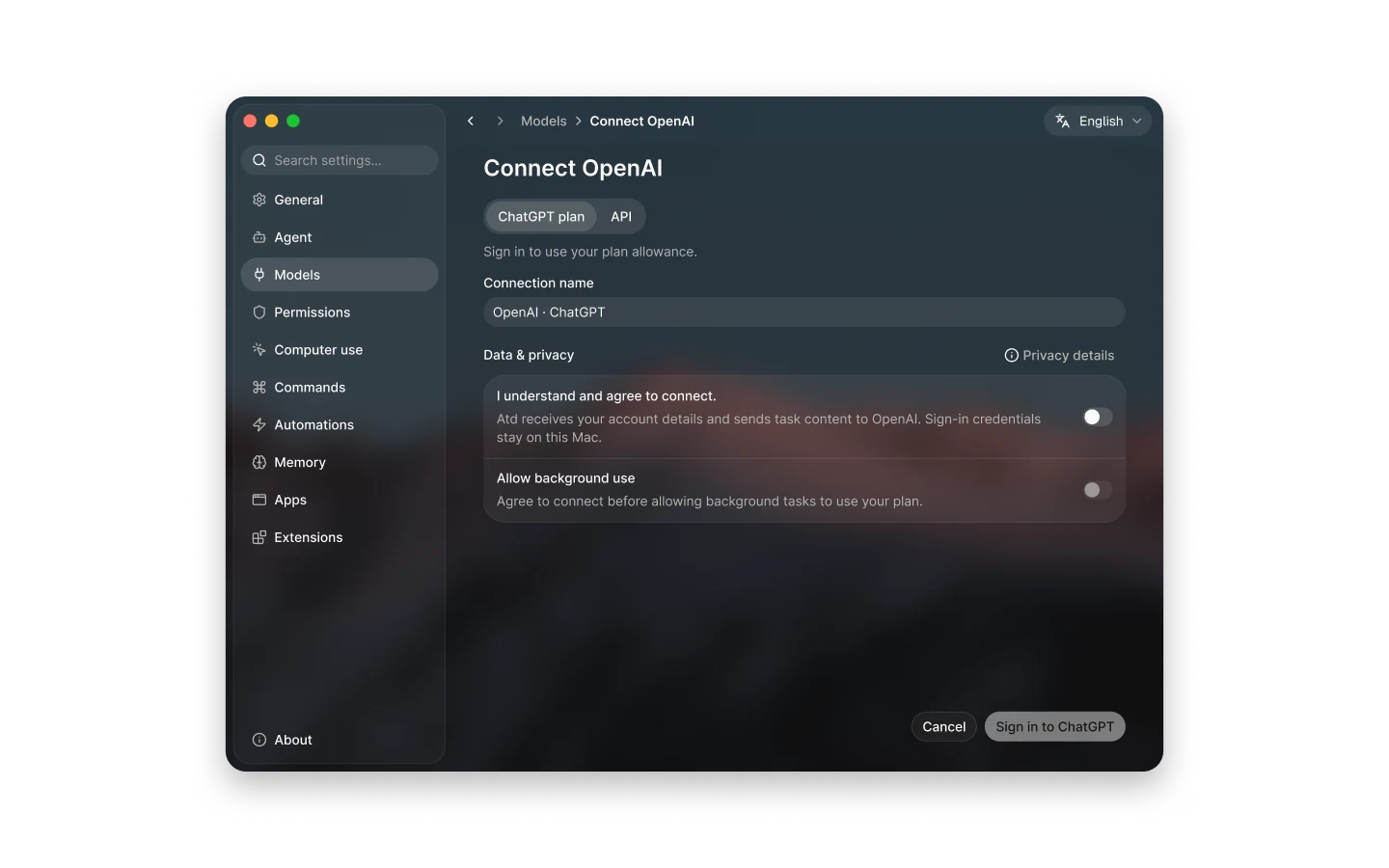
Add OpenAI, choose ChatGPT plan, and sign in to ChatGPT in your browser to use your plan’s allowance. Before you connect, Atd shows what the connection shares: it receives your account ID and email to identify the connection, and sends OpenAI the prompts, conversation context, attachments and tool results of your tasks.
Allow background use is off by default. Turn it on only if scheduled tasks, automatic memory reviews and your apps’ AI requests should also draw on your plan, including while you’re away.
Local models and custom endpoints
Run a model on your own machine with Ollama, LM Studio, llama.cpp or vLLM, and Atd fills in the runtime’s usual local address. An API key is optional, for servers that ask for one.
A custom provider connects to any other endpoint by its base URL, with an API key or bearer token if needed. Add each model by its exact ID and set its protocol (OpenAI Chat Completions, OpenAI Responses or Anthropic Messages), context window, maximum output tokens, and whether it supports reasoning and image input. Plain HTTP endpoints, including internal hostnames, are accepted, with a warning when the address isn’t on your own Mac.
Defaults per connection, a choice per task
Each connection keeps its own credentials and default model, and one connection is the default provider for new tasks. In the composer you can switch a task’s model and set its reasoning effort; tasks you already started keep the model they use.
Other features can use their own model: saved commands in Settings → Commands, automations in Settings → Automations, and Screen understanding in Settings → Computer use, which can hand screens to an image-capable model.
- Model aliases bundle a connection, model, context window and reasoning effort under one name; edit an alias once to update every bound command and automation, or cycle aliases in the composer with ⇧ ⌘ M or /model.
- Refresh models updates a connection’s model list.
- Verify model access sends one small request to confirm a connection works; it may use credits.
- Make default provider changes which connection new tasks start with.
Where your keys and requests go
API keys and sign-in tokens are stored in your Mac’s keychain. Requests go directly from your Mac to the providers you configure, never through an Atd server, and there is no Atd account to create.
If macOS later blocks access to a saved credential, for example after an update changes the app’s signing certificate, Atd flags the affected connections in Settings → Models. Re-enter the key or sign in again, and the endpoints, custom models and default choices stay as they were.
Questions
Can I use Atd with local models like Ollama or LM Studio?
Yes. Add Ollama, LM Studio, llama.cpp or vLLM under Local and custom in Settings → Models. Atd fills in the runtime’s usual local address, and no API key is needed unless your server asks for one. Make it the default provider or pick its models per task; how well a local model handles tools and long tasks depends on the model you run.
Can I use my ChatGPT subscription instead of an API key?
Yes, if your ChatGPT account is eligible to share its plan. In Settings → Models, add OpenAI, choose ChatGPT plan, agree to what the connection shares, and sign in to ChatGPT in your browser. Requests then use your plan’s allowance, while automations and memory maintenance stay off it until you allow background use.
Does Atd send my API keys or prompts to an Atd server?
No. Credentials stay in your Mac’s keychain, and each request goes from your Mac directly to the provider of the model you chose. That provider receives your prompt, conversation context and any attachments or tool results in the task, under its own policies.
Can I connect an OpenAI-compatible server or gateway?
Yes. Add a custom provider under Local and custom, enter its base URL and, if it needs one, an API key or bearer token. Then add models by exact ID with the protocol each one speaks: OpenAI Chat Completions, OpenAI Responses or Anthropic Messages.
Can different tasks use different models?
Yes. New tasks start with the default provider’s default model, you can switch a task’s model in the composer, and a task keeps its model when you change the defaults. Saved commands, automations and screen understanding for computer use can each have their own model.