Privacy and control
A private, local-first AI agent for Mac
Atd keeps your task history, settings and memories on your Mac, sends model requests to the providers you choose, and lets you decide what each task may do. It’s free, open source under the MIT License, and needs no Atd account.

Your data stays on your Mac
Atd runs a local agent service that starts when you open the app and stops when you quit. Task history, settings and memories are stored in ~/Library/Application Support/AgentService, and personal skills and agents in ~/.atd.
Model provider and MCP credentials are kept in your Mac’s keychain. Browser environments for computer use keep their sign-in data in separate profiles on your Mac, and each personal app keeps its data in its own folder.
No Atd account, your own providers
There’s no Atd account to create. Connect your own model providers in Settings › Models with an account sign-in, an API key or a local endpoint, and requests go to the providers you configure. Tools and MCP servers a task uses can reach the files and services their configuration and the task’s permissions allow.
Before you connect a ChatGPT plan, Atd shows what the connection shares and asks you to agree. Its sign-in tokens stay in your keychain and aren’t sent to an Atd server, and background use by automations, memory maintenance and apps stays off until you allow it.
Approve what each task can do
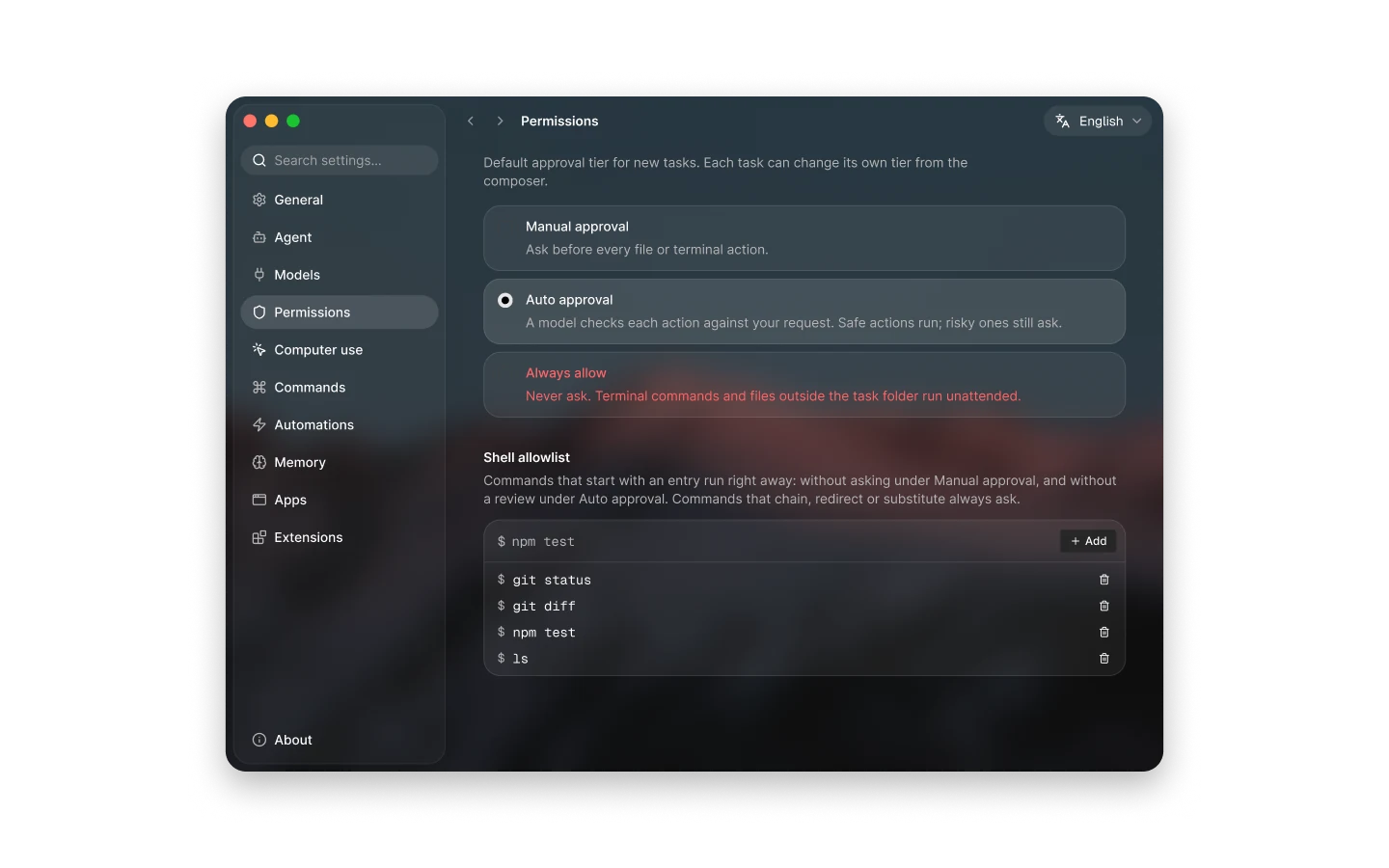
Every task has an approval mode you can change from the composer, and Settings › Permissions sets the default for new tasks.
- Manual approval asks before every file or terminal action.
- Auto approval has a model check each action against your request: safe actions run and risky ones still ask. New installations start here.
- Always allow never asks, including for terminal commands and files outside the task folder, and Atd asks you to confirm before switching to it.
- The shell allowlist lets commands that start with an entry you add run right away; commands that chain, redirect or substitute always ask.
- Computer use asks for access to each app or website a task needs, and Stop all in Settings › Computer use stops computer actions across tasks and automations.
Memory you can review and pause
Atd learns stable preferences and clear corrections as you work. In Settings › Memory you can read, filter, edit, turn off and delete each memory, turn on Ask before saving so learned memories wait in Suggestions until you accept them, or turn off Learn automatically; memories you already have stay usable while learning is off.
Learning uses your configured model and may make additional model calls. Automation runs can read memory but never add to it.
Careful captures and open source
Text you cover with the mosaic tool or Cover Sensitive Info can’t be picked and is left out of the recognized text sent with a screenshot. A screen recording sends its detected steps and on-device narration, not the video file itself.
Atd is open source under the MIT License, so anyone can read how it stores data and talks to providers. When troubleshooting, open Diagnostics beside About in Settings to run the 7-layer Doctor, test live probes without recording text or pixels, or preview and export a redacted support bundle that scrubs personal paths, keys, tokens and conversation content.
Questions
Where do my prompts go?
To the model providers you configure in Settings › Models, together with the conversation context, attachments and tool results the task includes. Tools and MCP servers a task uses can also reach the services their configuration allows. Your task history, settings and memories stay on your Mac, and there’s no Atd account.
Where are my API keys stored?
In your Mac’s keychain, along with sign-ins and MCP credentials. If macOS blocks access to a saved key, for example after a signing certificate update, Atd flags the affected connection in Settings › Models so you can enter the key or sign in again without losing its other settings.
Can Atd run commands without asking?
Only if you let it. Manual approval asks before every file or terminal action, Auto approval lets a model allow safe actions and still asks about risky ones, and Always allow runs everything without asking once you confirm it. Commands that match your shell allowlist run right away under Manual and Auto approval.
How do I stop Atd from learning about me?
Turn off Learn automatically in Settings › Memory. Nothing new is saved while it’s off, and the agent can still use memories you already have. To review first instead, turn on Ask before saving, and learned memories wait in Suggestions until you accept them.
Can I keep sensitive details out of a screenshot?
Yes. Cover them with the mosaic tool or Cover Sensitive Info before you ask about the screenshot. Covered text can’t be picked and is excluded from the recognized text sent with the capture.